
GitFlow Workflow: The Traditional Branching Model, and When It Still Makes Sense
A practical guide to main, develop, release and hotfix branches, with commands, diagrams, and the mistakes that trip teams up.
If you've worked at a company with quarterly releases, a QA team, and a "release candidate" Slack channel, you've almost certainly touched GitFlow. Vincent Driessen published it in 2010, back when most teams shipped software on a schedule rather than on every merge. It became the default answer to "how should we branch?" for about a decade.
These days it gets a lot of side-eye. Some of that is deserved. But GitFlow isn't dead, it's just often used on projects it was never meant for. Let's go through how it actually works, where it hurts, and how to run it without making your team miserable.
The core idea
GitFlow uses two long-lived branches and three kinds of short-lived ones.
Long-lived:
main(ormaster): always matches what's in production. Every commit here is a release, and it's tagged.develop: the integration branch. It holds the next release's work.
Short-lived:
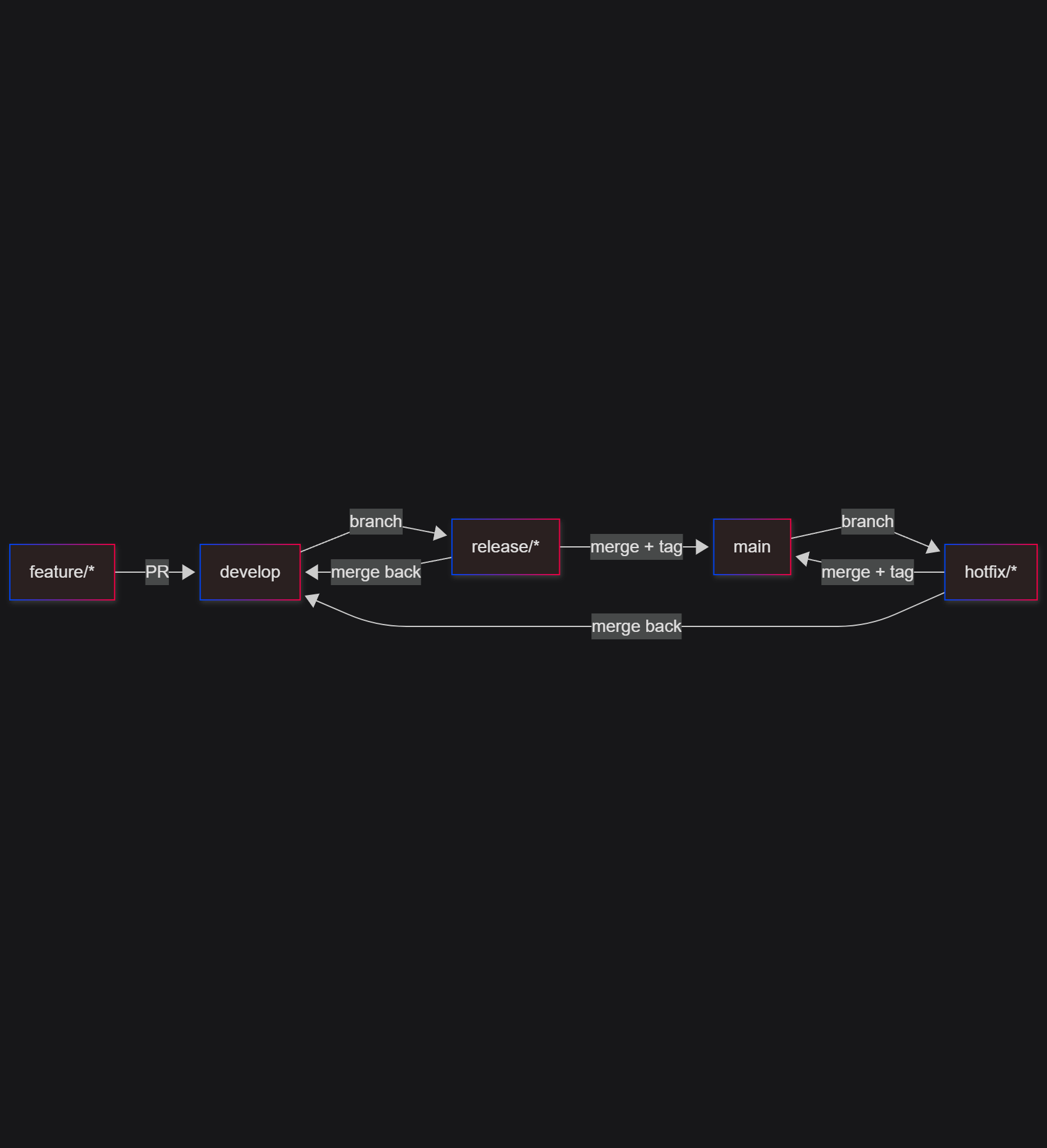
feature/*: branched fromdevelop, merged back intodevelop.release/*: branched fromdevelopwhen you're ready to stabilize. Only bug fixes go here. Merged into bothmainanddevelop.hotfix/*: branched frommainto patch production fast. Merged into bothmainanddevelop.
The flow, visualised
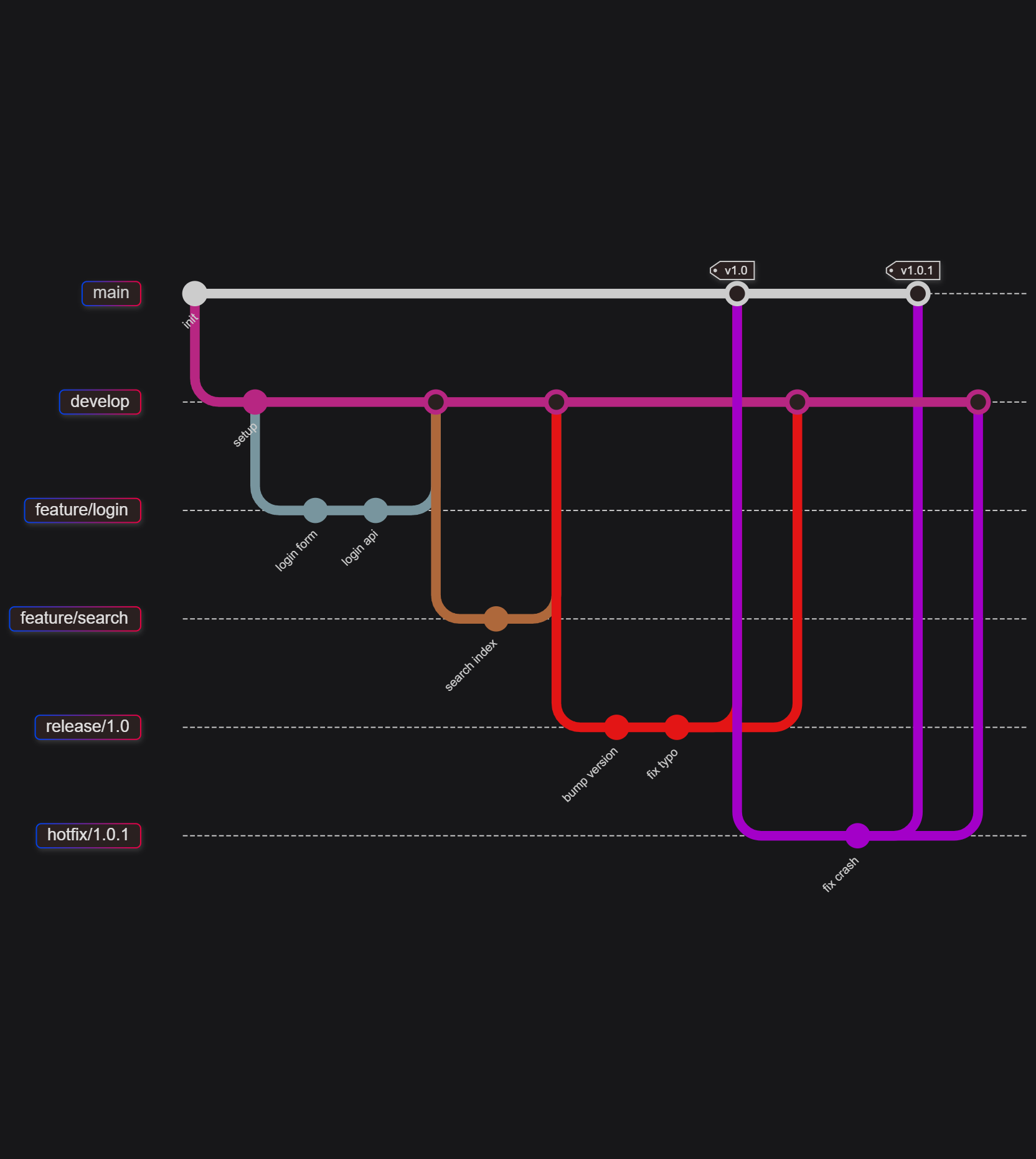
Notice that release and hotfix branches merge twice. That's the part people forget, and it's the most common source of "why is this bug back?" incidents.
Working through it with real commands
Starting a feature
git checkout develop
git pull origin develop
git checkout -b feature/user-profile

# ...work, commit, push...
git push -u origin feature/user-profile
When it's done, open a PR into develop. I'd recommend --no-ff merges here so the feature stays visible as a unit in history:
git checkout develop
git merge --no-ff feature/user-profile
git branch -d feature/user-profile
Cutting a release
git checkout develop
git checkout -b release/1.4.0

# bump version, update changelog, fix last-minute bugs
git commit -am "Bump version to 1.4.0"
Once QA signs off:
git checkout main
git merge --no-ff release/1.4.0
git tag -a v1.4.0 -m "Release 1.4.0"

git checkout develop
git merge --no-ff release/1.4.0

git branch -d release/1.4.0
git push origin main develop --tags
Hotfixing production
git checkout main
git checkout -b hotfix/1.4.1

# fix the bug
git commit -am "Fix null pointer in payment handler"

git checkout main
git merge --no-ff hotfix/1.4.1
git tag -a v1.4.1 -m "Hotfix 1.4.1"

git checkout develop
git merge --no-ff hotfix/1.4.1
git branch -d hotfix/1.4.1
One gotcha: if a release/* branch is open when you hotfix, merge the hotfix into the release branch instead of develop. It'll reach develop when the release merges back.
Branch lifecycle at a glance
What GitFlow is good at
- Scheduled, versioned releases. Mobile apps, desktop software, firmware, on-prem products, anything where you can't just redeploy.
- Supporting multiple versions in production. If customers are on v2.3 and v3.1 at the same time, you need long-lived release lines.
- Formal QA and sign-off. The release branch gives testers a stable target while developers keep moving on
develop. - Clear audit trail.
mainplus tags gives you a clean history of exactly what shipped.
Where it hurts
Be honest with yourself about these before you adopt it.
- Long-lived branches drift. A feature branch that lives for three weeks will conflict with everything. The longer it lives, the worse the merge.
- Double merges are easy to botch. Forget to merge a hotfix back into
developand you've re-introduced a bug. - It slows down CI/CD. If you deploy multiple times a day,
develop→release→mainis pure ceremony. - Two "sources of truth." Is
developthe truth, ormain? New joiners ask this constantly. - Heavy process for small teams. A team of four doesn't need five branch types.
Even Vincent Driessen added a note to his original post saying that if you're doing continuous delivery, you should probably use something simpler. Worth reading.
Best practices if you do use it
- Keep feature branches short. Days, not weeks. If a feature is huge, use feature flags and merge incomplete work behind a flag.
- Rebase feature branches on
developregularly (git rebase develop) so integration pain stays small. - Protect
mainanddevelop. Require PRs, reviews, and passing CI. Nobody should push directly. - Automate tagging and changelogs. Tools like
semantic-release,standard-version, orgit-cliffremove the human-error part. - Use a consistent naming convention.
feature/JIRA-123-short-descriptionpays off every time you search through branches. - Delete merged branches. Turn on "auto-delete head branches" in GitHub/GitLab.
- Automate the back-merge. A small CI job that opens a PR from
maintodevelopafter every release or hotfix saves you from forgotten merges. - Consider
git-flowCLI extensions (git flow feature start, etc.) if your team likes commands over memorizing sequences. Just make sure everyone understands what they do underneath.
Quick decision check
GitFlow is a reasonable fit if most of these are true:
- You ship versioned releases, not continuous deploys
- You maintain more than one production version
- You have a dedicated QA/stabilization phase
- Your team is large enough that integration isolation helps
If you're nodding at fewer than two of these, look at GitHub Flow or Trunk-Based Development instead.
Wrapping up
GitFlow solves a real problem: coordinating work when releases are infrequent, expensive, and need stabilization. It just solves it with a lot of machinery. Use it deliberately, automate the boring parts, and don't be afraid to move off it when your release cadence changes.
If this helped you, I'd really appreciate your support. You can buy me a coffee here: buymeacoffee.com/vatul16 ☕
Thanks for reading!
About the author
- Hi, I'm Atul! I am a software engineer with a strong focus on DevOps, Cloud Infrastructure, and automation. I spend my time building scalable CI/CD pipelines, mastering tools like Docker, Terraform, and AWS, and breaking down complex cloud concepts into accessible, hands-on tutorials. I believe the best way to learn is to build, break, and document the process.
Comments
Join the discussionGood call on the gotcha about merging a hotfix into the open release branch instead of develop. That's the one that bites people, and I've seen it cause exactly the "why is this bug back?" moment you describe. One small tip from experience: a short checklist in the PR template for release and hotfix branches ("merged to main, merged to develop, tag pushed") cut our double-merge mistakes a lot. Do you think GitFlow still pays off for a small team shipping a web app, or only for versioned products?
Really appreciate that, Ethan. A PR checklist is a great practical safeguard, especially for the back-merges and tag pushes that are easy to miss when a hotfix is urgent.
Great question. And it sets up the rest of this series nicely. I’m covering GitHub Flow, GitLab Flow, and Trunk-Based Development in upcoming posts, then wrapping up with a practical guide for choosing based on release cadence, team size, QA needs and deployment maturity. For a small team shipping a web app, I’d usually lean toward GitHub Flow or trunk-based development. GitFlow makes more sense when releases need a dedicated stabilization phase or support for multiple versions.
That makes sense, thanks for laying out the series plan. Choosing by release cadence and stabilization needs is a much more useful frame than picking a model by name, so I'm looking forward to the decision guide.
Thanks, Ethan! I’m glad that framing resonated. It’s easy to get caught up in the names and diagrams, but release cadence, risk tolerance, and how much stabilization a team actually needs are what should drive the choice. I’ll make sure the decision guide stays practical and includes clear signals for when each model fits best.
The release-cadence check at the end is useful. It makes the choice about how the team ships, rather than which branching diagram looks most organized.
Exactly! The release cadence should drive the branching strategy, not the visual appeal of the workflow. GitFlow adds useful structure when releases need stabilization and coordination, but it becomes unnecessary overhead for teams that can safely deploy small changes continuously. Thanks for highlighting that point.
In your experience, what is usually the clearest signal that a team has outgrown GitFlow?
Git Branching Strategies: A Practical Guide for Teams
A five-part, hands-on series on Git branching strategies. We go through GitFlow, GitHub Flow, GitLab Flow and Trunk-Based Development, with diagrams, real commands, pipeline examples, pros, cons and best practices. The final post helps you decide which strategy fits your team, release style and level of automation.